Important Notes:
- Before a member can be added to a group, they need to exist as a user in the application. Instructions on adding users can be accessed here.
- Members have different group roles which will affect their rights within the group. More information about group roles is provided below.
- Only the Group Chair, Group Administrator, or a user with administrative privileges can add or remove members from a group.
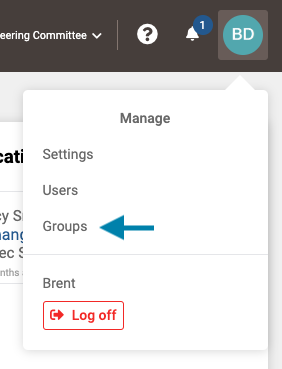
- First access the list of all groups by clicking on your profile icon in the upper right corner of the application and choosing 'Groups' from the drop down menu that appears.
Note: A user may also select the Group from the Group drop-down list to the left of the help icon if the they are already a member of the group.
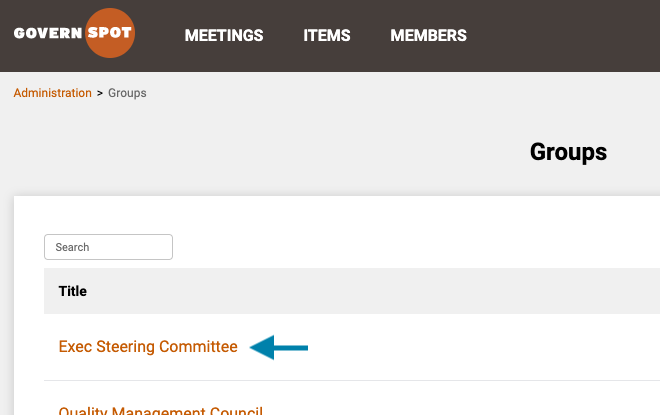
- Next, select the group you wish to add the user to by clicking on the group name.
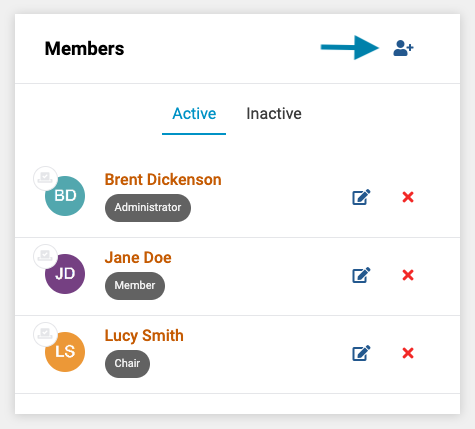
- Next, click on the blue 'Add Member' icon in the upper right of the Members list on the group page.
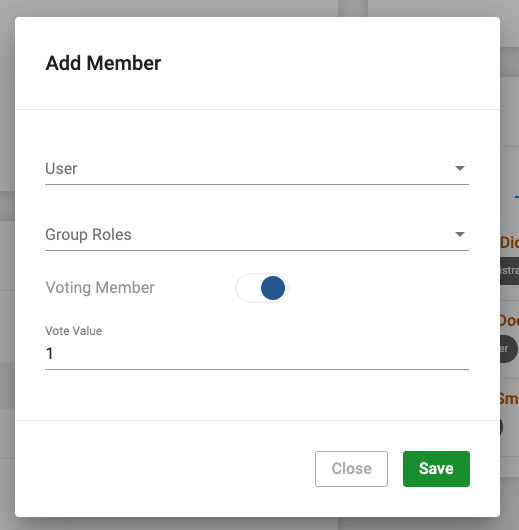
- Next, complete the add member form as follows:
- Select the user to add from the drop down menu. If you do not see the user, you may have to add the user to the system. Instructions for adding a new system user may be accessed here.
- Pick one or more roles from the Group Roles list:
- Group Member - This role possess the right to access all group information and may possess other rights assigned by the Group Administrator or Chair. A group member may also be assigned action items.
- Group Chair - This role possesses all read, edit, and delete rights to a group's information.
- Group Administrator - This role possesses all read, edit, and delete rights to a group's information.
- Group Observer/Auditor - This role possesses read-only permissions to a group's information. Unlike other group roles, a member with the role of 'observer/auditor' may not possess any other role in the group.
- Select whether the member may vote on decisional topics within the group.
- Establish a vote value for the member if the member has voting rights. Note: The default value for a vote is 1, however, a different value may be assigned. For example, a members number of shares may be entered giving their vote a weighted value relative to other values, or a group chair may be given a higher value vote than regular members.
After completing the form, click the 'Save' button to add the user to the group.
Comments
0 comments
Article is closed for comments.