Important Notes:
- A user can set certain preferences to control the behavior of the system. Current settings include:
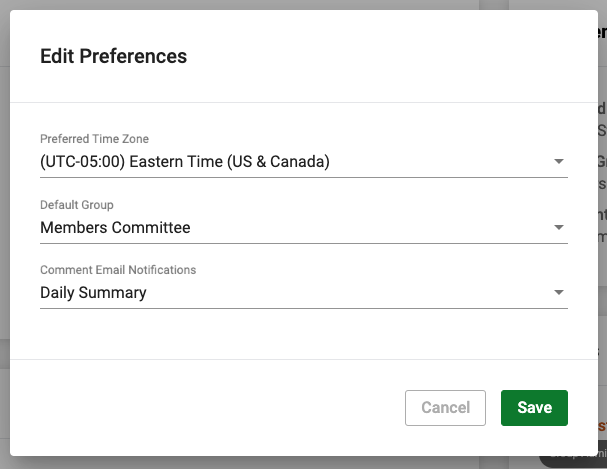
- Preferred Time Zone - This setting will affect the delivery time of any daily email notifications as well as default any time zone/timezone selections used throughout the application.
- Default Group - This setting is used to automatically select a specific group you are member of each time you open the application.
- Comment Email Notifications - This setting will change the frequency with which you receive email notifications when a user posts a comment on a group topic.
- On Every Comment (Default) - You will receive an email for every comment or comment response
- Daily Summary - You will receive an email at 7PM EST/4PM PST summarizing all comments or comment responses posted in the previous 24 hours
- Never - You will not receive emails when comments or comment responses are posted
- Preferred Time Zone - This setting will affect the delivery time of any daily email notifications as well as default any time zone/timezone selections used throughout the application.
- New preference settings will be added over time - you can propose a preference setting here.
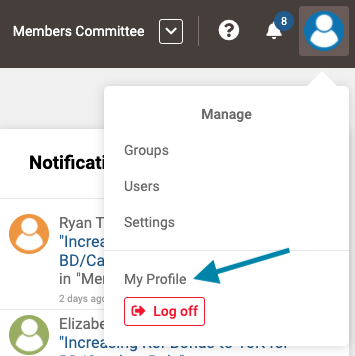
- To change your user preferences, first open your profile by clicking on your user icon in the upper right corner of the screen and selecting 'My Profile'.
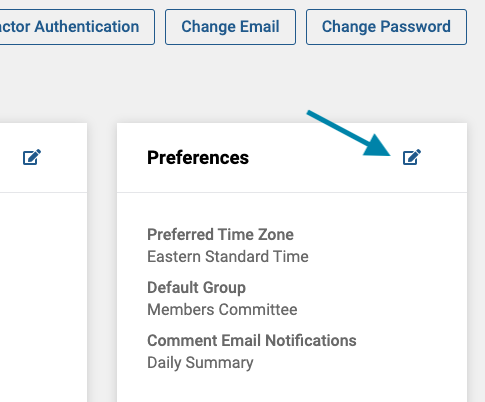
- Next, click on the 'edit' icon in the top right corner of the 'Preferences' frame.
- Lastly, edit your preferences and when completed, click the green 'Save' button to return to your profile.
Comments
0 comments
Article is closed for comments.