Important Notes:
- A group may optionally require that voting members motion to open a vote. Information on enabling or disabling motioning can be found here.
- The number of motions required to open a vote may be set to 1 or 2 (seconded).
- The system will record all motions and count them in the order in which the motion was recorded - therefore even if the original motion is rescinded prior to vote opening, the seconded motion will become the first motion and the next motion, if any will become the seconded motion.
- A successful number of motions does not automatically open a vote. A group chair or administrator will still be required to open a vote, but the system will disable the ability to do so without the required number of motions.
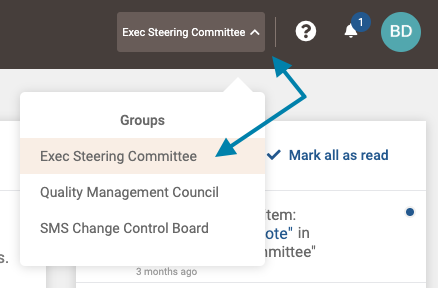
- First, select the group which contains the topic you wish to motion for a vote on from the group selection menu in the upper right area of the application.
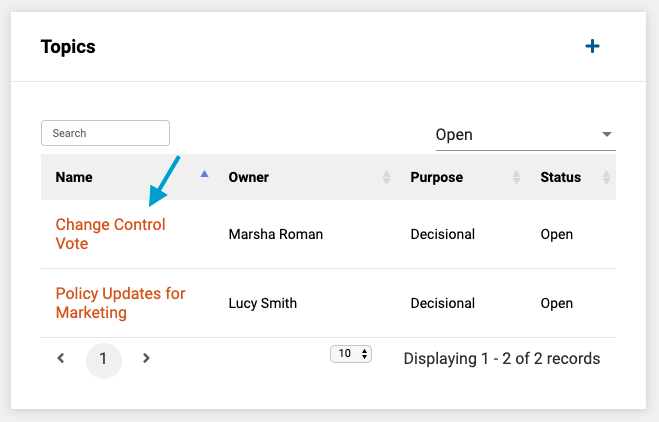
- Next, in the Topics frame on the group page, select the topic you wish to motion on by clicking on its title in the list of topics.
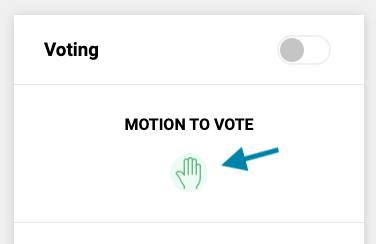
- Next, in the 'Voting' frame on the topic page under 'Your Vote', click the 'hand symbol.
Note: A motion may be made or rescinded prior to the vote being opened by clicking on the hand a second time.
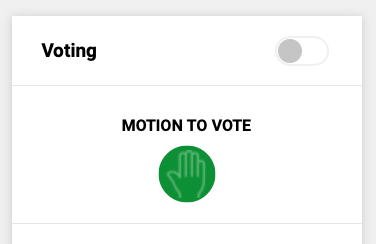
- A successful motion will turn the hand symbol a dark green color as shown below.
Comments
0 comments
Article is closed for comments.