Important Notes:
- Editing a connected Zoom account name will only change its appearance in the application.
- Because other members of a group may create or edit meeting which include their Zoom accounts, we recommend giving your Zoom account a distinct name, such as ,"Mary's Zoom Account" rather than simply "Zoom Account".
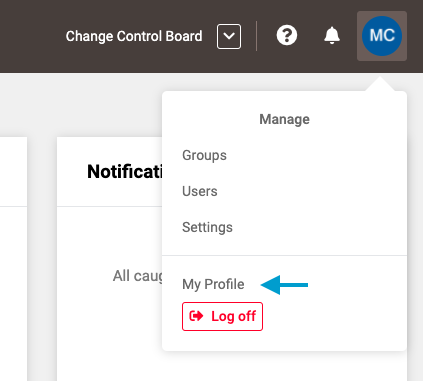
- First, select 'My Profile' from the drop down menu located in the upper right corner of the application.
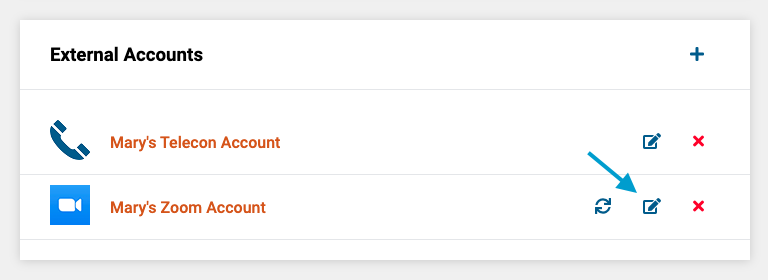
- Next, click the edit icon next to name of the account you wish to change.
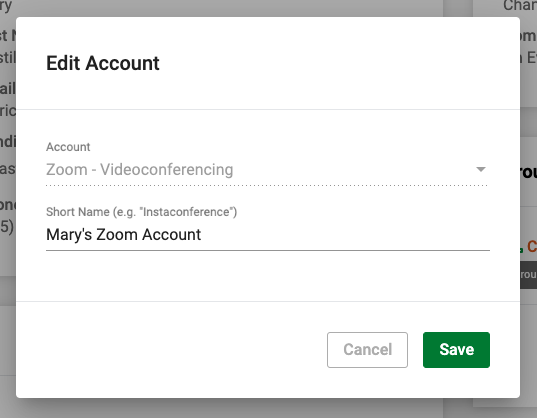
- Lastly, enter the desired name for the account and click the green 'Save' button in the lower right corner of the form.
Comments
0 comments
Article is closed for comments.